Claude Code Use Cases: What It Does for a Solo Builder
A feature list tells you what Claude Code can do. A job list tells you what it is worth. Here is mine.
Most lists of Claude Code use cases read like the product page in a different order. Refactor code. Write tests. Fix bugs. All true, and all useless if you are one person trying to decide whether the tool earns a place in your week.
So this is a different list. Every use case below is a job Claude Code does in my own setup, with the date it started and what went wrong along the way. I run mrb2beast.com and the marketing around it mostly alone. Gaapp, my goal app, gets about an hour a day. That little time is the reason I care about leverage at all.
Some of these jobs are coding. Most are not.
Key takeaways
- Claude Code is an agent that reads your files, edits them and runs commands. That makes it useful far beyond code: anything that lives in files and can be checked by a script is fair game.
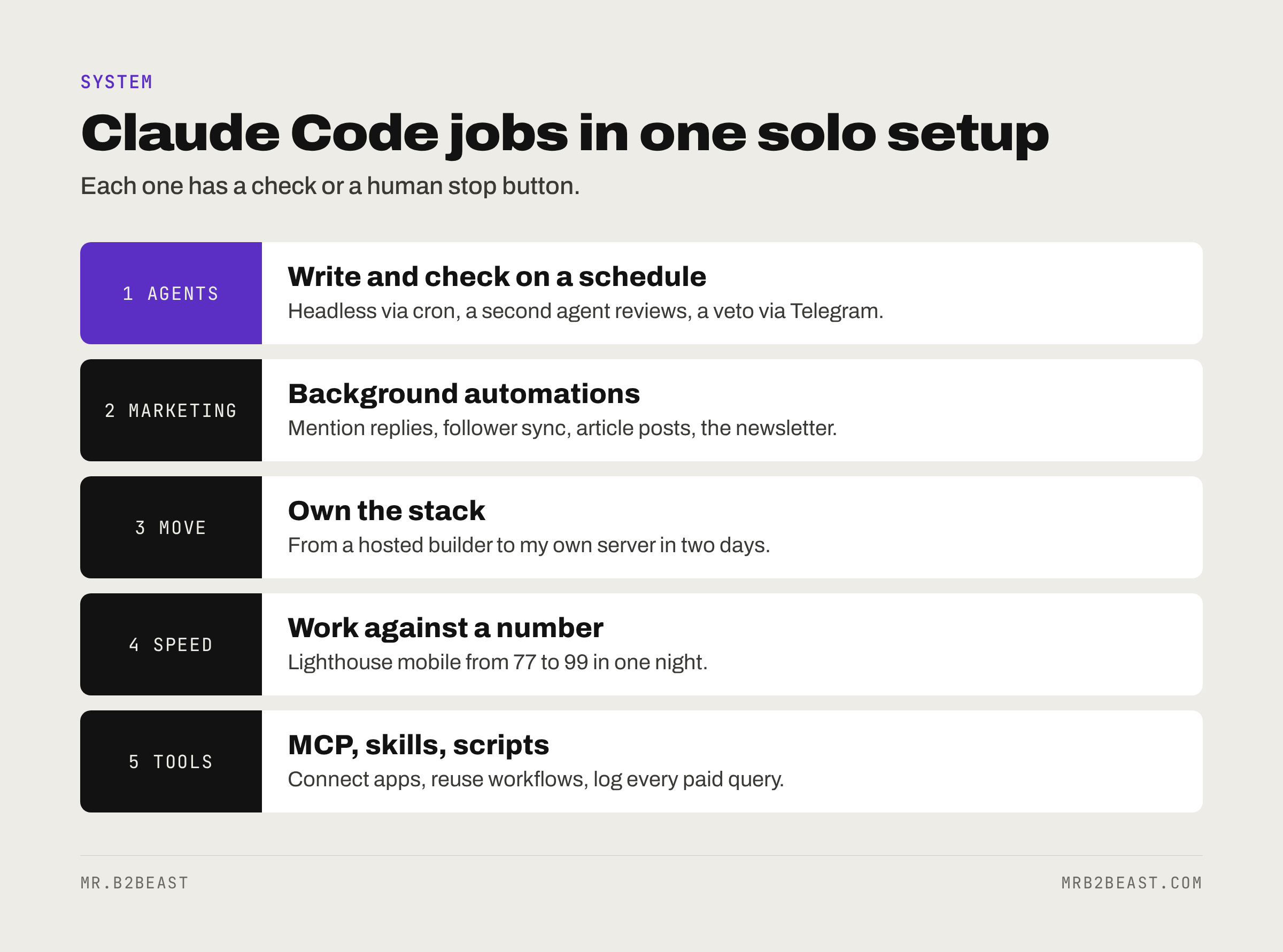
- My seven jobs: scheduled agents, marketing automations, a site move, speed work, debugging, tool connections and skills. Most of them are not coding.
- The limit is not what Claude Code can do. It is what you can check. Every job here has a check or a human stop button, and the one job without a good check failed quietly.
What can Claude Code do? The short answer
Anthropic describes Claude Code as "an agentic coding tool that reads your codebase, edits files, runs commands, and integrates with your development tools". It runs in the terminal, in VS Code and JetBrains, in a desktop app and in the browser.
In plain words, it can do five kinds of work:
- Read and change files. Code, but also Markdown, JSON, CSV, config files. Anything on disk.
- Run commands. Tests, builds, scripts, git. It reads the output and decides the next step.
- Talk to other tools. Through MCP servers, it can reach apps like a scheduler, a browser or a database. The Claude MCP guide explains how that works.
- Follow written instructions. A
CLAUDE.mdfile in the project and reusable skills tell it how you work, so you do not repeat yourself every session. - Run without you. With
claude -p, it runs non-interactively from a script or a scheduler, does the job and exits.
Point five changed how I use it. An assistant you chat with saves you minutes. An agent that runs on a schedule saves you the task.
My Claude Code use cases: seven real jobs
Here is the map of the jobs below, starting with the ones that run every week without me.
1. Scheduled agents that write and check
Since 2026-10-19, an agent (Claude Code, running headless via cron on my own Hetzner server) writes my X posts 10 to 14 days ahead. A second agent checks them. I approve nothing in advance and only stop, via Telegram, what I do not like.
Why this works with Claude Code and not with a chat window: the job is a file with instructions, the output is a file, and the check is a second run with different instructions. Nothing needs a person in the loop until the very end. If you want to build something like it, how to build an AI agent that runs on a schedule walks through the build, and Claude Code subagents covers the writer and reviewer pattern inside one repo.
The honest part: in the first batch of 24 posts on 2026-10-19, the checking agent rejected nothing. That can mean the writer was good. It can also mean the reviewer was too polite. I keep the veto for exactly that reason.
2. Marketing automations that run in the background
The second job is a set of small automations, each of which replaced a recurring chore:
- Replies to mentions run through the X API, with a hard daily cap.
- A follower sync runs three times a week.
- Every new article on this site goes out as an X post automatically, since 2026-10-08.
- Since 2026-10-20, an agent writes and schedules the newsletter. The welcome mail goes out automatically after someone confirms.
Together they form one loop. An article goes live on mrb2beast.com, it gets announced on X, and readers land in the newsletter. None of these jobs is clever. Each one is a task I used to do by hand, every week, in the same way. That is the pattern to look for.
3. Moving a live site off a hosted builder
My site started in Lovable. In October 2026, I moved it to my own Hetzner server: started on 2026-10-06, new site live on 2026-10-07. The reasons were plain: Lovable costs, used-up build credits, and Claude Code was already included in my Max subscription.
The steps: code to GitHub, my own database in Frankfurt with all 13 migrations, data copied over and verified by checksum, Docker behind Caddy, staging first, then the switch. I did the move with Claude Code. The full story, including when you should stay on a builder, is in Lovable vs Claude Code.
4. Speed work against a number
After the move, I spent one night with Claude Code on performance. In local Lighthouse runs on 2026-10-20, three runs each, the homepage went from 77 to 99 on mobile and scored 100 on desktop. Accessibility, Best Practices and SEO scored 100 each. Article pages went from 95 to 99 on mobile. PageSpeed Insights had shown 73 on mobile before; the official re-measurement there is still open.
This use case worked because the goal was a number Claude Code could measure itself. Change, measure, read, try again. Give it a vague goal like "make it faster" and you get vague work back.
5. Debugging what AI-written code broke
The code I took over from Lovable contained a CSRF check. Behind my own server, that check blocked every request with a 403. The homepage loaded and then fell apart. I only noticed because PageSpeed returned no score on desktop.
Claude Code is good at this kind of hunt: read the error, trace it through files, find the cause, fix it, run the check again. The lesson is less about the fix and more about the order. AI-written code fails in places nobody looked, so the check has to come from outside. Here, a speed tool caught a security setting.
6. Connecting tools with MCP
I use four MCP servers in Claude Code: Postiz (my own server, it schedules the X posts), Composio (for other apps), Chrome control (for browser tasks like the X developer console) and Context Mode (it keeps large tool outputs out of the context).
The one I deliberately do not use as MCP is DataForSEO. Keyword research runs through a script instead, so every query gets logged with its cost. That is a use case in itself: Claude Code calls a script you wrote, and the script enforces the rules you care about.
7. Skills for the work that repeats
Skills are written workflows Claude Code loads when they fit the task. I use three: gstack (/browse for pages and screenshots), Superpowers (test-driven building and systematic debugging) and my own design skill for every graphic. Claude skills explained covers what they are and when a custom one pays off.
Claude Code for marketing: what it actually does
If you search for Claude Code for marketing, you mostly find prompts for ad copy. That undersells it. The marketing value is not the writing. It is the plumbing around the writing.
Anthropic's own growth marketing team is a good public example. In their July 2025 report on how their teams use Claude Code, they describe a workflow that processes CSV files with hundreds of existing ads, finds the weak ones and writes new variations within the platform's character limits. Using two specialized subagents, it "generates hundreds of new ads in minutes instead of hours".
My marketing use cases are smaller and look similar in shape:
- Scheduling. Posts are written into a queue and handed to Postiz through an API, not copied and pasted.
- Distribution. A new article triggers an X post. Nobody has to remember.
- Email. The newsletter is written, built and scheduled by an agent.
- Research. Keyword data comes from a script with a cost log, not from guessing.
What I keep human in marketing matters as much. Claude Code never posts replies under other people's posts in my setup. Those are drafts, and I post them myself. More on that list below. If you want the X side of this without any code, the X tips cheat sheet collects what creators agree on.
Claude Code for non developers: can you use it without coding?
Yes, with one honest caveat: it starts in a terminal for most people, and that is a real hurdle the first day.
Anthropic published a story in January 2026 about a marketer on their team who had to Google how to open a terminal and had never written a line of code. He built a custom slash command for search ads and a Figma plugin that generates ad variations. The post puts the result at 30 seconds per ad, down from 30 minutes. His advice for getting started: "just start with a very, very small and easy thing."
That matches what I see. Claude Code for non developers works when three things are true:
- The work lives in files or behind an API. Spreadsheets, text, a scheduler with an API. If the only way in is clicking through a web app, start somewhere else.
- You can tell good output from bad. You do not need to read the code. You do need to judge the result: the post, the page, the number.
- You start with one boring task. Rename files, clean a CSV, draft a weekly summary. Not "build me a business".
You do not have to live in the terminal either. The desktop app and the web version run the same engine, and the desktop app can schedule recurring tasks on its own.
What Claude Code does not do in my setup
A list of use cases is only half the picture. Here is what I never automate, with Claude Code or anything else: replies under other people's posts (only drafts, I post myself), follows other than follow-backs, reposts, DMs other than the lead magnet, the engagement group, everything on LinkedIn, and emails to individual people.
The rule behind the list: automate what is frequent, written down and cheap to get wrong. Keep a person where a mistake costs trust.
And automation fails quietly when the check is weak. Three weekly recap posts from 2026-10-16 to 2026-10-18 had unfilled placeholders instead of numbers and post references. They stayed as drafts in Postiz and never went out. A connect post on 2026-10-19 at 23:00 failed to publish. None of that was dramatic. All of it would have been embarrassing without a stop button. The AI operating system article shows how the parts and the human checks fit together.
How to find your first Claude Code use case
You do not need seven jobs. You need one that pays for the setup. Here is how I would pick it:
- List what you did twice last week in the same way. Posting, reports, copying data, renaming, checking a page. Write each one down.
- Cross out anything without a check. If you cannot say what "done right" looks like, Claude Code cannot either. Lighthouse worked because it is a number.
- Write the job as instructions in a file. Steps, rules, what to never do. That file becomes your
CLAUDE.mdor a skill. - Run it by hand with Claude Code three times. Fix the instructions after each run. Most of the value appears here.
- Only then schedule it. Headless, with a log and a way to stop it. A job that runs without you must also be stoppable without you at the desk.
The Claude Code best practices piece goes deeper into step four: how to keep sessions clean and give Claude a check it can run.
FAQ
What are the main Claude Code use cases? Building features, fixing bugs, writing tests, refactoring and handling git are the classic ones. Beyond code, it works for anything that lives in files or behind an API: scheduled content, reports, data cleanup, research scripts and tool connections through MCP. The best use case is the task you repeat every week that has a clear check.
What can Claude Code do that a chat assistant cannot?
It works directly in your files and terminal, runs commands, reads the results and keeps going until the job is done. It can also run headless on a schedule with claude -p, so it does tasks without you opening a window. A chat assistant gives you text to copy. Claude Code changes the files itself.
Is Claude Code good for marketing? Yes, mostly for the plumbing: scheduling posts through an API, triggering announcements, building newsletters, processing ad data and running research scripts. Anthropic's own growth marketing team uses it to generate ad variations from CSV data. Keep a human on anything that talks to real people one to one.
Can non developers use Claude Code? Yes. You need to be willing to open a terminal or use the desktop app, and you need to judge the output. Start with one small, boring task that lives in files, and only grow from there.
Is Claude Code free? No. Most surfaces need a paid Claude subscription or an Anthropic Console account with API billing. For me, Claude Code was already included in my Max subscription, which was one reason I moved my site to it.
About the author
Tristan Eilenburg. One person. AI systems. Global reach. I write about building systems that work, with evidence instead of hype.
- X: @MrB2Beast
- LinkedIn: Tristan Eilenburg
- Instagram: @mrb2beast
If this one taught you something, the newsletter is where the next one lands first.
Sources
- Anthropic. Claude Code overview. https://code.claude.com/docs/en/overview
- Anthropic. Run Claude Code programmatically. https://code.claude.com/docs/en/headless
- Anthropic (2025). How Anthropic teams use Claude Code. https://claude.com/resources/articles/how-anthropic-teams-use-claude-code
- Anthropic (2026). How Anthropic uses Claude in Marketing. https://claude.com/blog/how-anthropic-uses-claude-marketing