Claude Skills Explained: What They Are and When to Use Them
A skill is the instruction you are tired of typing, saved once and loaded only when it matters.

What are Claude skills? The short answer: a skill is a folder with a file called SKILL.md that teaches Claude how to do one specific job. Claude reads a one-line description of every skill up front and loads the full instructions only when a task needs them.
That sounds small. It changes how you work with Claude. Without skills, you either paste the same instructions into every chat or you stuff everything into one giant prompt that Claude reads all the time. Skills are the third option: the right instructions, at the right moment, without the clutter.
Most guides on this topic do one of two things. They list fifty skills to install, or they explain governance for large companies. This one is for people who run things alone or in small teams. I will show you the three skills I use in Claude Code, where skills end and other tools begin, and how to build your first one without overthinking it.
Key takeaways
- A Claude skill is a folder with a SKILL.md file: a short description plus instructions, and optionally scripts and reference files. Anthropic launched skills on 2025-10-16.
- Claude loads skills in layers. Only the name and description sit in context all the time. The body and extra files load when a task calls for them.
- Build a skill when you catch yourself typing the same instructions twice. Use MCP to reach a tool, a subagent to split off work, and a plain prompt for everything you only ask once.
What are Claude skills, exactly?
Anthropic describes skills as folders that include instructions, scripts and resources that Claude can load when needed. The engineering team behind them uses a better picture: building a skill is like putting together an onboarding guide for a new hire.
That analogy is worth keeping. A new hire does not read the whole company wiki before every task. They know roughly what exists, and they open the right page when the task shows up. Skills give Claude the same habit.
Every skill has the same core:
- A folder named after the skill.
- A SKILL.md file inside it. The top holds a short block of settings, called frontmatter. The rest is plain Markdown with the instructions.
- Optional extras: reference documents, examples, templates or scripts that Claude opens or runs only when the instructions point to them.
The most important line in the whole file is the description. It tells Claude what the skill does and when to use it. If the description is vague, Claude will not reach for the skill at the right moment, no matter how good the instructions below it are.
Since 2025-12-18, skills follow an open standard called Agent Skills, which Anthropic published for portability across platforms. Claude Code builds on that standard and adds its own extras, such as control over who can start a skill and the option to run a skill in a separate subagent.
What a SKILL.md file looks like
Here is a small example. It is a skill that checks a draft post against a set of writing rules:
---
name: post-check
description: Check a draft social media post against my writing rules. Use when I ask to review, check or tighten a post before it goes out.
---

Check the draft in $ARGUMENTS against these rules:

1. One idea per post.
2. No hashtags, no emojis.
3. Every number needs a date or a source.
4. The first line has to work on its own.

Return the draft with fixes, then one line per rule: pass or fail.
That is a complete skill. The settings block on top names it and describes it. The body is what Claude follows. $ARGUMENTS is a placeholder for whatever you type after the skill name, in this case the draft.
How Claude skills work: three levels of loading
The reason skills scale is a design idea Anthropic calls progressive disclosure. Claude loads a skill in three levels, and each level only when the one before it says it is relevant.
Level 1: name and description. At startup, Claude reads the name and description of every installed skill. That is all. It knows the skill exists and roughly when it applies.
Level 2: the SKILL.md body. When your request matches a description, Claude loads the full instructions. In Claude Code, the body then stays in context for the rest of the session.
Level 3: extra files. If the instructions reference other files, like a style guide, a long example or a script, Claude opens them only when it needs them. Scripts can be run without their code ever being read into the conversation.
Why does that matter? Because context is a budget. Everything Claude has to read takes space that could go to your actual task. A skill with a 2,000 line reference document costs almost nothing until the moment that document is useful.
Claude Code adds a few practical limits worth knowing:
- The description, together with an optional
when_to_usefield, is cut at 1,536 characters in the skill listing. Put the trigger words at the start. - The documentation recommends keeping SKILL.md under 500 lines and moving detail into separate files.
- When a long session gets compacted, each skill that was already used keeps up to 5,000 tokens, with 25,000 tokens for all skills together. Older skills can drop out if you used many.
You can start a skill two ways. Claude can load it on its own when your request matches the description, or you type /skill-name at the start of your message. In Claude Code, custom slash commands and skills are now the same thing: a file in .claude/commands/ and a skill folder in .claude/skills/ both create a command, and old command files keep working.
If you never want Claude to start a skill by itself, for example one that deploys something, set disable-model-invocation: true in the frontmatter. Then only you can run it.
Claude skills vs MCP, subagents, projects and prompts
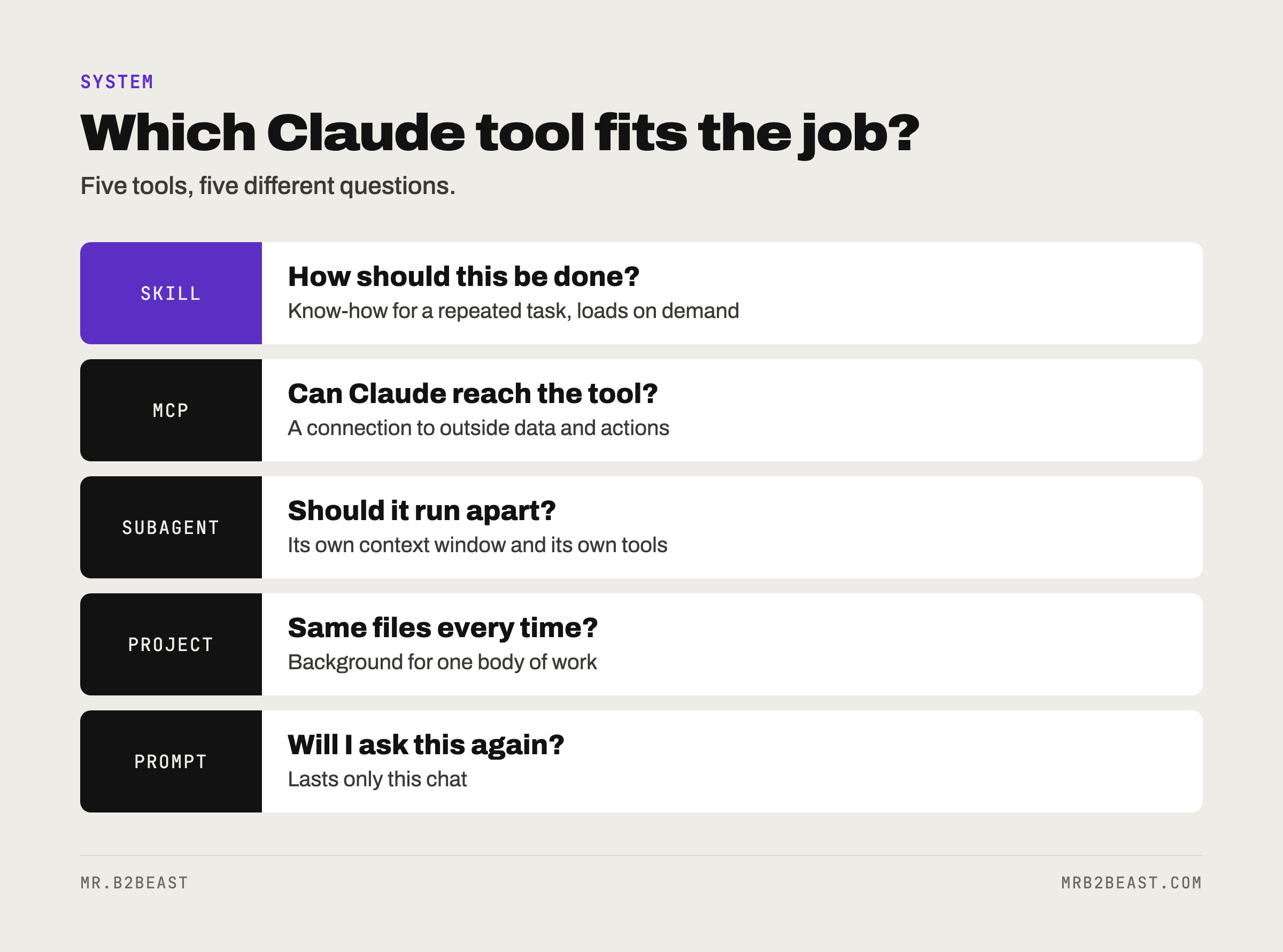
This is where most confusion sits, because all five shape what Claude does. Anthropic published a comparison in March 2026 that boils it down well. I added my own one-line test for each.
| Tool | What it gives Claude | Loads when | My test |
|---|---|---|---|
| Skill | Know-how for a repeated task | On demand | Am I typing the same instructions again? |
| MCP | Access to an outside tool or data | Always connected | Can Claude not reach the system? |
| Subagent | A separate worker with its own context | When called | Should this run apart from my main session? |
| Project | Background knowledge for one body of work | Every chat in the project | Does every chat about this need the same files? |
| Prompt | An instruction for right now | This chat only | Will I ever ask this again? |
Skills vs MCP. Anthropic's help center puts it in one sentence: MCP connects Claude to external services and data sources, skills provide the procedural knowledge for how to do a task. They are partners, not rivals. My guide to Claude MCP covers the connection side, including the servers I run and the one tool I keep as a script.
Skills vs projects. A project in the Claude app keeps the same background files in every chat inside it. A skill only shows up when the task needs it, and it works everywhere, not just inside one project. Use a project for "everything about this client". Use a skill for "how I write a proposal".
Skills vs prompts. A prompt lives and dies with one conversation. That is fine for one-off questions. The moment you find a prompt you keep in a notes file to paste again, it wants to be a skill.
Claude skills vs agents
This is the comparison people search for most, and the line is clean. A subagent is a separate assistant with its own context window and its own tool permissions. It does a piece of work on its own and reports back. A skill is not a worker. It is a set of instructions any worker can pick up.
So the two combine. Anthropic's comparison notes that subagents can use skills too. In Claude Code you can even tell a skill to run inside a subagent with context: fork in the frontmatter. The skill then becomes the task, and the subagent does it without seeing your main conversation.
My rule of thumb: if the question is "how should this be done", write a skill. If the question is "who should do this, and with what tools", set up an agent. I wrote up how that looks in practice in my guide to Claude Code subagents. If you want to see what agents do well in practice, and where they still fail, read my look at AI agents for small business.
Where you can use Claude skills
Skills work in three places, with slightly different rules.
The Claude apps. According to Anthropic's help center, skills are available on Free, Pro, Max, Team and Enterprise plans, and they require code execution to be turned on. You find them under Customize, then Skills, where you can browse a directory or add your own. Anthropic also ships ready-made skills for documents, so Claude can create Excel spreadsheets with formulas, PowerPoint decks, Word documents and fillable PDFs. There is a skill called skill-creator that walks you through building a custom one.
Claude Code. Here skills are files on your machine. A personal skill lives in ~/.claude/skills/<skill-name>/SKILL.md and works in all your projects. A project skill lives in .claude/skills/<skill-name>/SKILL.md inside the repository, so you can commit it and everyone who works on the project gets it. Plugins can bundle skills as well. Claude Code watches these folders, so most edits apply without a restart.
The API. Developers can attach skills to Messages API requests and manage them through a skills endpoint. That route needs the code execution tool, which Anthropic lists as beta.
For a solo builder, Claude Code is where skills get interesting, because the skill sits next to the code and the files it works on. That is also where mine live, next to the other habits in my Claude Code best practices.
Best Claude skills: the three I use
Every list of the best Claude skills ranks dozens of them. Here are the three I use, and what each one does for me.

1. gstack, for the browser. I use its /browse command whenever Claude needs to look at a web page: open it, read it, take a screenshot. Claude sees what a page really shows instead of guessing from the code.
2. Superpowers, for building and fixing. Two of its workflows earn their place: building test first, and debugging systematically. Test first means Claude writes a failing test before the code that makes it pass. Systematic debugging means Claude has to find the cause before it is allowed to propose a fix. Both slow Claude down in the right places.
3. My own design skill, for every graphic. Every graphic I make goes through it. The skill holds the rules of my design system, so a new graphic follows the same system as the last one.
Notice what these three have in common. None of them adds raw power. Claude could already browse, test and design. Each skill adds a way of doing it that I would otherwise have to explain again in every session. That is the real test for any skill on any best-of list: does it replace instructions you keep repeating, or is it a clever demo you will use once?
My advice for picking skills from a list: start with zero. Add one only when you notice a gap you have hit at least twice. Ten installed skills you never trigger are not free, because each description still sits in Claude's context.
When a custom skill pays off, and when it does not
Anthropic's own guidance is the simplest version of the rule: if you keep typing the same instructions across conversations, make a skill. I use four checks before I write one.
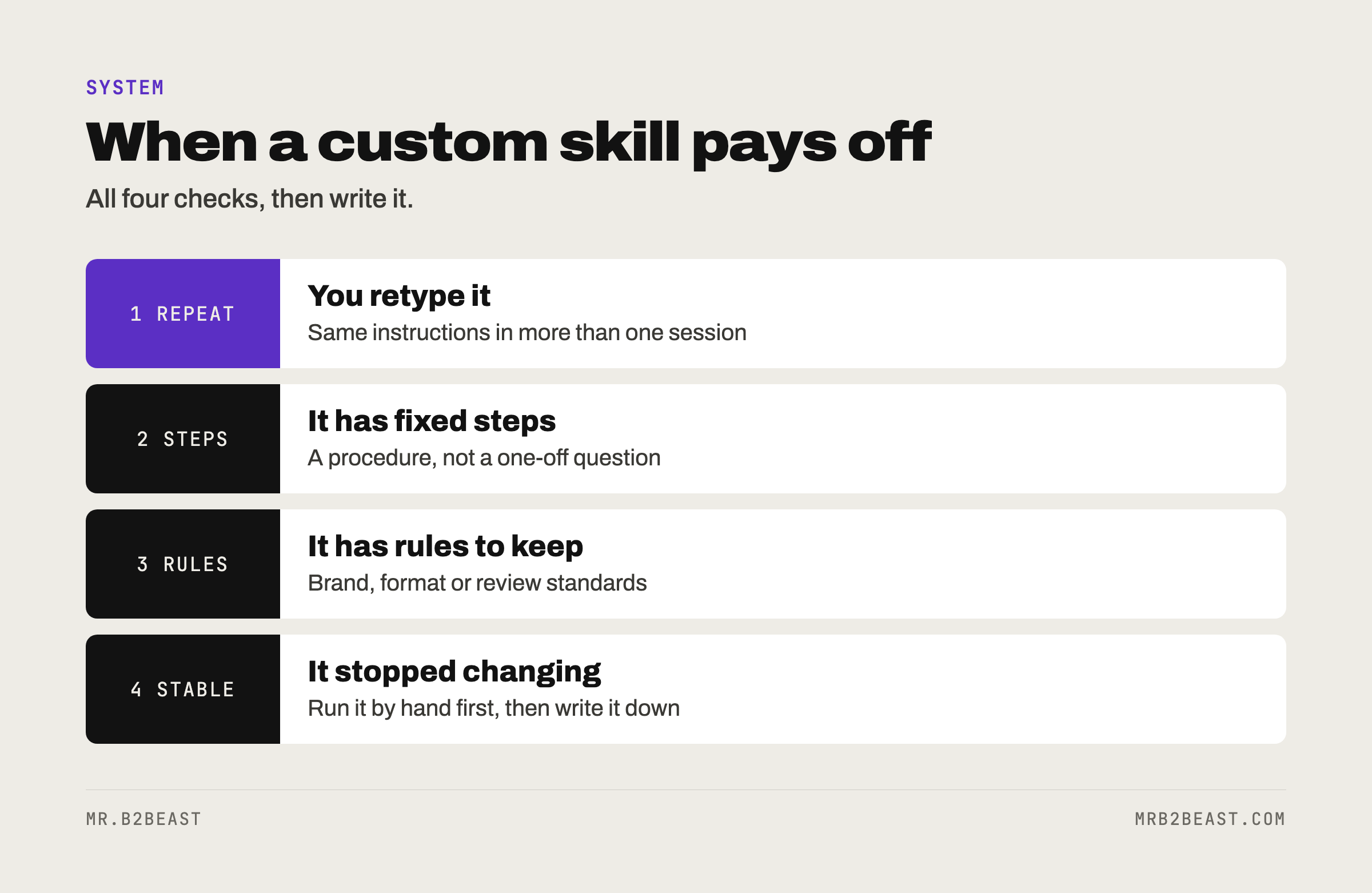
1. You repeat it. Not once, not "maybe later". You have typed or pasted the same instructions in more than one session.
2. It has fixed steps. A procedure, not a question. "Review this draft against these rules" is a skill. "What do you think of this idea" is a prompt.
3. It has rules to keep. Brand rules, formats, review standards, naming conventions. Anything where you notice when Claude drifts.
4. The process has stopped changing. This is the one people skip. If you are still figuring out how you want something done, a skill freezes a process you have not finished designing. Do it by hand a few times first. It is the same order I argued for in AI workflow automation: write the process, run it, then automate it.
When a skill does not pay off:
- One-off tasks. The time to write the skill is larger than the time you save.
- Pure knowledge. If Claude only needs to know facts about one project, a project or a CLAUDE.md file is simpler.
- Missing access. If the problem is that Claude cannot reach a tool, no instructions will fix that. You need an MCP server or a script.
- Hope for speed. A skill makes Claude more consistent, not automatically faster or smarter. More AI does not equal more output, as the AI productivity study on experienced developers showed.
How to create Claude skills: your first one in five steps
Building a skill takes less time than reading about it. Here is the route I would take in Claude Code. In the Claude apps, the skill-creator skill does the same job through a conversation.
Step 1: Pick one repeated task. Look back at your last few sessions. Which instruction did you type more than once? Start there. One task, one skill.
Step 2: Create the folder. For a personal skill, make a folder like ~/.claude/skills/post-check/. For a skill that belongs to one project, put it in .claude/skills/post-check/ inside the repository.
Step 3: Write the description first. Before the instructions, write one or two sentences that answer two questions: what does this skill do, and when should Claude use it? Use the words you would actually type. "Use when I ask to review, check or tighten a post" works better than "post quality assurance".
Step 4: Write the steps. Numbered, short, one action per line, the way you would brief a sharp new colleague. Add what a good result looks like. If you have a long reference, like a style guide, put it in a separate file in the same folder and point to it from SKILL.md, so it only loads when needed.
Step 5: Test it both ways. First, type /post-check with a draft and see if the result matches what you wanted. Then ask in plain words, "can you check this post", and see whether Claude picks the skill on its own. If it does not, the description is the problem, not the instructions. Fix the description and try again.
A few settings are worth knowing once the basics work:
disable-model-invocation: truekeeps Claude from starting the skill on its own. Use it for anything with side effects.allowed-toolslets the skill use certain tools without asking for permission each time.context: forkruns the skill in a separate subagent that does not see your conversation. Only useful when the skill contains a concrete task, not just guidelines.
For a more formal check, the skill-creator plugin in Claude Code runs test prompts with and without your skill and compares the results. For a first skill, the two manual tests above are enough.
How to use Claude skills safely
A skill is a set of instructions plus, sometimes, code that runs on your machine. Treat it like software, because it is.
Anthropic's advice is to install skills only from trusted sources. For anything less trusted, read the skill before you use it: the SKILL.md, the bundled files and any code dependencies. Watch for instructions that tell Claude to connect to outside networks you did not expect.
One Claude Code detail deserves extra attention. The allowed-tools field grants permissions while the skill runs, and the documentation notes that this applies even in folders you have not marked as trusted when Claude Code runs headless. So before you run Claude Code in a repository someone else wrote, look at the skills in .claude/skills/ and what they allow.
My own practice is boring on purpose: I only run skills whose source I know, I read new ones before the first run, and anything that touches money, publishing or deletion gets disable-model-invocation: true.
The bottom line
So, what are Claude skills? They are written habits. A folder, a description and a set of steps that Claude picks up when the task fits and ignores when it does not.
They do not make Claude more capable. They make Claude more consistent, which for repeated work is the thing you actually want. Start with one task you are tired of explaining. Write the description first, test it twice, and keep it small. When Claude needs to reach a tool rather than follow a procedure, that is a job for MCP, not for another skill.
FAQ
What are Claude skills in simple terms? Claude skills are saved instructions for a specific task, stored as a folder with a SKILL.md file. Claude sees a short description of every skill and loads the full instructions only when a request matches. They work in the Claude apps, in Claude Code and through the API.
How do I build a Claude skill?
Create a folder with the skill's name and add a SKILL.md file. At the top, write a name and a description that says what the skill does and when to use it. Below it, write the steps in plain Markdown. In Claude Code, put the folder in ~/.claude/skills/ or in .claude/skills/ inside a project.
What is the difference between Claude skills and MCP? MCP connects Claude to outside tools and data, like a scheduler or a database. Skills teach Claude how to do a task, like reviewing a draft or following a design system. You often use both together: the MCP server provides access, the skill provides the procedure.
Are Claude skills free? According to Anthropic's help center, skills are available on Free, Pro, Max, Team and Enterprise plans in the Claude apps, as long as code execution is turned on. In Claude Code, skills are plain files you can write yourself.
What is an AI skill? In the Claude world, an AI skill is a packaged piece of know-how an AI agent can load when it needs it, instead of carrying every instruction all the time. Since December 2025 this format is an open standard called Agent Skills, so the idea is not limited to Claude.
About the author
Tristan Eilenburg. One person. AI systems. Global reach. I write about building systems that work, with evidence instead of hype.
- X: @MrB2Beast
- LinkedIn: Tristan Eilenburg
- Instagram: @mrb2beast
The newsletter goes out once a week. If this one taught you something, the newsletter is where the next one lands first.
Sources
- Anthropic (2025, October 16; updated 2025, December 18). Introducing Agent Skills. https://claude.com/blog/skills
- Anthropic (2025, October 16). Equipping agents for the real world with Agent Skills. https://www.anthropic.com/engineering/equipping-agents-for-the-real-world-with-agent-skills
- Anthropic (2026, March 5). Skills explained: How Skills compares to prompts, Projects, MCP, and subagents. https://claude.com/blog/skills-explained
- Anthropic (2026). Extend Claude with skills. Claude Code documentation. https://code.claude.com/docs/en/skills
- Anthropic (2026). What are skills? Claude Help Center. https://support.claude.com/en/articles/12512176-what-are-skills