Claude Code Best Practices for Solo Builders
Ten rules that held up after I moved a live site off Lovable and kept building it with Claude Code.

Most lists of Claude Code best practices are long. Thirty tips, forty tips, a cheat sheet per feature. They are not wrong. They are just hard to use when you are one person with a side project that gets about an hour a day.
That is my situation with Gaapp. And in October 2026 I moved my own site, mrb2beast.com, from Lovable onto a Hetzner server I control. Since then Claude Code does the building.
This article is the short version of what survived. Ten rules. Each one either protects Claude's context or adds a check Claude can run. Where I have my own numbers, you get them. Where I don't, you get the official docs.
Key takeaways
- Context is the one constraint behind almost every Claude Code best practice. Keep CLAUDE.md short, clear sessions often, push research into subagents.
- Give Claude a check it can run: tests, a build, a screenshot, a Lighthouse run. Without one, "looks done" is the only signal.
- Rules that must hold every time belong in hooks, not in prose. Prose is a request. A hook is enforcement.
The one constraint behind every Claude Code best practice
The official best practices page opens with a single idea: Claude's context window fills up fast, and performance degrades as it fills.
The context window holds everything. Every message, every file Claude reads, every command output. One debugging session can eat tens of thousands of tokens. As it fills, Claude starts to forget earlier instructions and makes more mistakes.
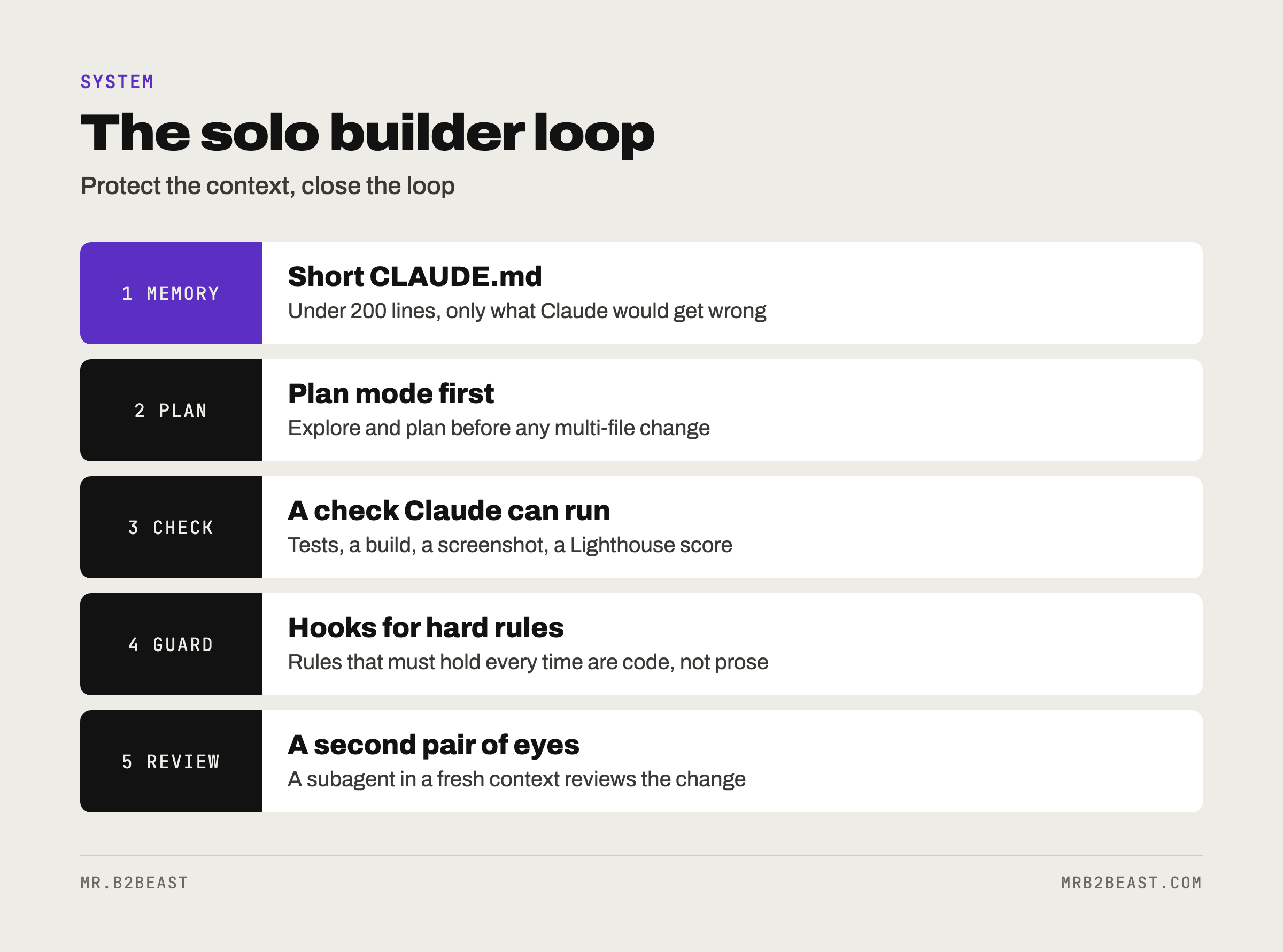
Once you see that, most tips stop looking like a random list. They fall into two groups:
- Protect the context. Short memory files, fresh sessions, research in separate workers, skills that load only when needed.
- Close the loop. Give Claude something that returns pass or fail, so it can finish the job without you as the test suite.
Every rule below belongs to one of those two groups.
1. Keep CLAUDE.md short and treat it as memory
CLAUDE.md is a file Claude reads at the start of every session. It carries what Claude cannot infer from the code: commands, style rules that differ from defaults, project quirks, things that bite.
Where it lives decides who it applies to:
./CLAUDE.mdor./.claude/CLAUDE.mdfor the project, shared through git.~/.claude/CLAUDE.mdfor your personal preferences across all projects../CLAUDE.local.mdfor private notes on one project. Add it to.gitignore.
Files in the directories above your working directory load at launch. Files in subdirectories load when Claude starts working there.
The size rule is the one people break. The docs say to target under 200 lines per file, because longer files cost more context and reduce adherence. Their test for every line is blunt: "Would removing this cause Claude to make mistakes?" If not, cut it.
What belongs in it:
- Bash commands Claude can't guess.
- Testing instructions and the test runner you prefer.
- Architecture decisions specific to your project.
- Gotchas that aren't obvious from the code.
What doesn't: anything Claude can figure out by reading code, long tutorials, file-by-file descriptions, and "write clean code".
Two more details that matter in practice. You can import other files with @path/to/file, but imported files also load at launch, so imports organize a long file without making it cheaper. And if Claude keeps skipping one instruction, mark that one line as important. Mark ten lines and none stands out.
My trigger for editing CLAUDE.md comes straight from the docs: when Claude gets a convention or command wrong twice, it goes in the file. A correction in chat dies with the session. A line in CLAUDE.md survives it.
2. Use Claude Code plan mode before multi-file changes
Letting Claude jump straight into code can solve the wrong problem. Plan mode separates exploring from editing. In plan mode, Claude reads files and answers questions but changes nothing.
How to use it:
- Press
Shift+Tabuntil the status bar shows plan mode, or start withclaude --permission-mode plan. - Ask Claude to read the relevant code and explain how it works.
- Ask for a detailed plan: which files change, in what order, how you will know it worked.
- Press
Ctrl+Gto open the plan in your editor and fix it by hand. - Approve the plan, then let Claude implement and test against it.
The docs recommend four phases: explore, plan, implement, commit. They also say when to skip it: "If you could describe the diff in one sentence, skip the plan." A typo or a renamed variable does not need a plan.
My site move is the kind of change plan mode exists for. It started on 2026-10-06 and the new site was live on 2026-10-07. The steps were: code onto GitHub, my own database in Frankfurt with all 13 migrations, the data copied over and confirmed identical by checksum, Docker behind Caddy, staging first, then the switch.
Look at that list. Six steps, each with a clear "done". That is what a good plan reads like. If you can't write the list, you are not ready to let Claude edit files.
3. Give Claude a check it can run
This is the rule with the biggest payoff. The docs put it in one line: "Claude stops when the work looks done." Without a check, you are the check. Every mistake waits for you to notice it.
A check is anything that returns a signal Claude can read:
- A test suite.
- A build exit code or a linter.
- A script that compares output against a known good file.
- A screenshot compared against a design.
Write the check first when you can. One of the skills I use, Superpowers, pushes exactly that: build test-driven, debug systematically. The test exists before the code, so "done" means "passes", not "looks fine".
Then make Claude show evidence instead of claiming success: the command it ran, what came back, the screenshot. Reading evidence is faster than redoing the check yourself.
My best example is speed. On 2026-10-20 I measured mrb2beast.com with Lighthouse, locally, three runs. The homepage on mobile went from 77 to 99. Desktop scored 100. Accessibility, Best Practices and SEO scored 100 each. Article pages on mobile went from 95 to 99. That happened in one night with Claude Code.
The night worked because Lighthouse is a number. Claude changed something, ran the measurement, read the score and tried again. A vague goal like "make it faster" gives Claude nothing to read. One caveat in fairness: these are local Lighthouse runs. PageSpeed Insights had shown 73 on mobile before, and the official re-test there is still open.
The docs also describe stronger versions of this rule. A Stop hook can run your check as a script and block the turn from ending until it passes. A reviewing subagent can try to refute the result with fresh eyes. Start with the prompt version. Add the rest when you run things unattended.
4. Test where the code actually runs
Here is the mistake that taught me this rule.
The code for mrb2beast.com came over from Lovable. It contained a CSRF check. Behind my own server, that check blocked every request with a 403 error. The homepage broke down right after loading.
Nobody saw it at first. It surfaced only because PageSpeed returned no value on desktop. A missing number was the only alarm.
Three lessons from that:
- Code that worked in one environment is untested in the next. The check only broke once it ran behind my own server.
- Staging first, then switch. That was already the order of the move, and it is the cheapest insurance you can buy.
- Treat an odd measurement as a bug report. "No value" is a result. It means something failed before the measuring even started.
Claude Code did not write that check, and Claude Code did not catch it on its own either. A measurement against the live site did. If you only let Claude verify in its own sandbox, you verify the sandbox.
5. Turn repeated work into skills
A skill is a folder with a SKILL.md file inside .claude/skills/. It holds knowledge or a workflow. By default only its name and description load at the start of a session. The full content loads when Claude uses it or when you call it with /skill-name.
That makes skills the opposite of CLAUDE.md. CLAUDE.md is always on. A skill is on demand. Reference material you need sometimes, like a style guide or a release checklist, belongs in a skill.
The docs give a clear trigger: when you paste the same playbook or multi-step procedure into chat for the third time, capture it as a skill. Two more tips from the same pages:
- For workflows with side effects, like deploying, set
disable-model-invocation: true. Then the skill only runs when you name it, and its description stays out of the context. - Write the description carefully. Claude matches your task against skill descriptions, so vague or overlapping ones load the wrong skill.
I use three: gstack, Superpowers and my own design skill. What each one does, and how to write your first, is in what Claude skills are.
6. Put hard rules in Claude Code hooks, not in prose
Hooks are your own shell commands that Claude Code runs at fixed points in its lifecycle. The docs draw the line clearly: CLAUDE.md instructions are advisory, hooks are deterministic.

That difference matters more than any prompt trick. "Never edit the .env file" written in CLAUDE.md is a request. A hook that blocks the edit is enforcement.
Some lifecycle events you can hook into:
PreToolUseruns before a tool call and can block it.PostToolUseruns after a tool call succeeds.SessionStartruns when a session begins or resumes.Stopruns when Claude finishes responding.Notificationruns when Claude is waiting for your input or permission.
Two examples straight from the docs. A PostToolUse hook with the matcher Edit|Write runs Prettier on every file Claude edits. A PreToolUse hook calls a small script that checks the target path against protected patterns like .env and exits with code 2 to block the edit. Claude gets the script's message as feedback and adjusts.
You configure hooks in .claude/settings.json and browse them with /hooks. You don't have to write them yourself. Ask Claude: "Write a hook that blocks writes to the migrations folder."
My rule of thumb: if breaking a rule would cost you an evening, it should not depend on Claude remembering it.
7. Use subagents for research and for review
A subagent is a separate worker with its own context window, its own tools and its own system prompt. It does the work and returns a summary. Your main conversation stays clean.
Two jobs make subagents worth it for a solo builder:
- Research. "Use subagents to investigate how our auth handles token refresh." The subagent reads the files. You get the answer, not thirty file dumps.
- Review. A reviewer in a fresh context sees only the change and the criteria, not the reasoning that produced it. The docs call this an adversarial review step. The bundled
/code-reviewskill runs exactly that on your current diff.
One warning from the docs is worth repeating. A reviewer asked to find gaps will usually find some, even when the work is fine. Tell it to report only gaps that affect correctness or the stated requirements. Otherwise you chase findings and over-engineer.
I run the writer and reviewer split on my X posts. How to set up that kind of team, and how to test a reviewer before you trust it, is in my guide to Claude Code subagents.
8. Be picky with MCP and prefer scripts when cost matters
MCP connects Claude Code to outside tools and data: a database, a browser, a scheduling tool. You add a server with claude mcp add. Tool names load at the start of a session, and the full schemas only load when Claude needs a specific tool, so idle servers cost little context.
Still, every connection is a door. I keep the list at four servers: Postiz, Composio, Chrome control and Context Mode. And one deliberate exception: DataForSEO runs as a script, not through MCP, so every query gets logged with its cost. When a tool charges per call, you want a line in a log, not a call hidden inside a conversation.
The docs make a related point about CLI tools. Tools like gh are the most context-efficient way to talk to outside services. If a good command-line tool exists, tell Claude to use it, or to learn it with --help.
What each of those servers does, and why the exception exists, is in Claude and MCP.
9. Claude Code tips for managing a session
Most bad results I see come from one session doing too much. The docs name the patterns, and the fixes are boring on purpose.
/clearbetween unrelated tasks. The docs call the alternative "the kitchen sink session": one task, then an unrelated question, then back again, and the context is full of noise.- Two corrections, then reset. If you corrected Claude twice on the same issue, the context is full of failed attempts. Clear it and write a better first prompt with what you learned.
Escstops,Esc Escrewinds. Every prompt creates a checkpoint./rewindrestores the conversation, the code, or both.- Checkpoints are not git. They only track changes made through Claude's file editing tools, not changes made by Bash commands. Commit anyway.
- Compact on purpose.
/compactwith an instruction, like "focus on the API changes", keeps what matters. - Name sessions.
/renamegives a workstream a name.claude --continuepicks up the last session,claude --resumelets you choose one.
For larger features the docs suggest one more habit: let Claude interview you first, write a spec, then start a fresh session to build it. The new session starts clean, and the spec is the brief.
Permissions belong here too. Pre-approve the commands you trust with /permissions, and use /sandbox to let sandboxed commands run without asking. After the tenth approval prompt you are not reviewing anymore, you are clicking.
10. Run recurring jobs headless, with a human stop button
Once something works in a session, you can run it without one. claude -p "your prompt" runs Claude Code non-interactively. Add --output-format json and a script can read the result. --allowedTools pre-approves exactly the tools the job needs.
That is how my X posts get written. Since 2026-10-19, Claude Code runs headless on a cron schedule on my own Hetzner server and writes them 10 to 14 days ahead. A second agent checks them. I approve nothing in advance and only stop what I don't like, via Telegram.
Two rules make this safe enough to sleep through:
- Test on a few first. The docs say it for batch jobs: refine the prompt on the first two or three items, then run the full set.
- Keep a stop button you can reach from your phone. Veto beats approval when you are one person. Approval makes you the bottleneck.
And expect things to break around the model, not only inside it. Three weekly recap posts from 2026-10-16 to 2026-10-18 still had unfilled placeholders instead of real content. They stayed as drafts and never went out. On 2026-10-19, a connect post at 23:00 failed at publishing. Both were reasons to keep the human in the loop.
The bigger picture of how headless jobs, agents and a stop button fit together is in the AI operating system.
Common Claude Code mistakes and their fixes
The docs list five failure patterns. They match what I see:
- Kitchen sink session. Fix:
/clearbetween unrelated tasks. - Correcting over and over. Fix: after two failed corrections, clear and rewrite the first prompt.
- Over-specified CLAUDE.md. Fix: prune hard, or turn a rule into a hook.
- Trust, then no verification. Fix: tests, scripts, screenshots. If you can't verify it, don't ship it.
- Infinite exploration. Fix: scope the question, or send a subagent.
Where Claude Code fits for a solo builder
None of this means Claude Code is the right tool for everything. Gaapp started in Lovable on 2026-09-08 and went live on 2026-09-11. By 2026-10-02 it had 781 commits there, with payments and Google login running through Lovable's own services.
I moved mrb2beast.com for plain reasons: Lovable costs, used-up build credits, and Claude Code was already included in my Max subscription. The trade is simple. You give up a hosted builder that handles a lot for you. You get your own server, your own database and full control, and with it every bug that used to be somebody else's problem, like that CSRF check.
If you are deciding between the two, I compared them in Lovable vs Claude Code. And if your bottleneck is not the code but the process around it, start with AI workflow automation.
FAQ
What are the most important Claude Code best practices?
Give Claude a check it can run, like tests or a build, and keep the context clean. In practice: a short CLAUDE.md, plan mode before multi-file changes, /clear between unrelated tasks, and subagents for research and review. Put rules that must always hold into hooks.
How long should a CLAUDE.md file be? The official docs recommend staying under 200 lines per file. Longer files cost more context and reduce how reliably Claude follows them. For each line, ask whether removing it would cause mistakes. Move occasional reference material into skills, which load only when needed.
When should I use plan mode in Claude Code? Use it when you are unsure about the approach, when a change touches several files, or when you don't know the code well. Skip it for small, clear fixes. The docs' test: if you can describe the diff in one sentence, you don't need a plan.
What are Claude Code hooks used for?
Hooks run your own scripts at fixed points, such as before or after a tool call or when Claude finishes. Typical uses are formatting every edited file, blocking edits to protected files like .env, and notifications. Unlike instructions in CLAUDE.md, a hook runs every time.
Should I use skills, subagents or hooks? Use a skill for knowledge or a workflow Claude should load on demand. Use a subagent when a task would flood your context or needs a fresh pair of eyes. Use a hook when something must happen the same way every time without Claude deciding.
About the author
Tristan Eilenburg. One person. AI systems. Global reach. I write about building systems that work, with evidence instead of hype.
- X: @MrB2Beast
- LinkedIn: Tristan Eilenburg
- Instagram: @mrb2beast
The newsletter goes out once a week. If this one taught you something, the newsletter is where the next one lands first.
Sources
- Anthropic (2026). Best practices for Claude Code. Claude Code Docs. https://code.claude.com/docs/en/best-practices
- Anthropic (2026). How Claude remembers your project. Claude Code Docs. https://code.claude.com/docs/en/memory
- Anthropic (2026). Automate actions with hooks. Claude Code Docs. https://code.claude.com/docs/en/hooks-guide
- Anthropic (2026). Extend Claude Code. Claude Code Docs. https://code.claude.com/docs/en/features-overview
- Anthropic (2026). Subagents. Claude Code Docs. https://code.claude.com/docs/en/sub-agents