AI Operating System: Run a One-Person Business Like a Team
Not a new kernel and not a smarter chatbot. An org chart for agents: who writes, who checks, who can stop the whole thing.
Search for "AI operating system" and you get three different things. Research papers about a new kind of kernel. Essays about the future of work. Vendor pages selling a platform.
None of them answers the question a one-person business actually has: how do I get work done by AI while I am doing something else, without it going off the rails?
Here is my answer, from a setup I run myself. Since 2026-10-19, one agent writes my X posts 10 to 14 days in advance. A second agent checks them. I approve nothing beforehand. I only stop what I do not like, through Telegram.
That is the whole idea of an AI operating system for one person. Not more AI. Clear roles, fixed rules and one human who keeps the brake.
Key takeaways
- For a solo business, an AI operating system is a set of roles, rules and stopping points, not a product you buy.
- Separate the agent that writes from the agent that checks, and give the human a veto instead of an approval queue.
- Decide in writing what you will never automate. That list matters more than any tool.
What is an AI operating system?
The term is used in three ways, and it helps to know which one you are reading about.
1. The research meaning. In 2024, a team at Rutgers published AIOS, an "LLM agent operating system." It treats agents like programs on a computer. A kernel handles scheduling, context, memory, storage and access control so many agents can share one model. This is infrastructure. It is not something you set up on a Tuesday afternoon.
2. The LLM OS idea. In his November 2023 talk "Intro to Large Language Models," Andrej Karpathy described the language model as the center of a new kind of operating system, tying together tools, a file system and different kinds of input and output. It is a useful picture: the model is the processor, everything else plugs in.
3. The business meaning. This is the one most people searching for the term care about. Here an AI operating system is the layer that decides which AI does which job, with which tools, under which rules, on which schedule, and who can stop it.
What is an AI operating system for a one-person business? It is a written setup of roles (who writes, who checks, who decides), tools (what each agent may touch), a clock (when each job runs) and brakes (how a human stops it). The software matters less than the structure. Without the structure, you have a chatbot you visit, not a team that works.
AI operating system vs personal AI assistant vs AI chief of staff
These three labels get mixed up, and the difference decides what you build.
A personal AI assistant answers when you ask. You open the chat, you type, it helps. When you close the tab, nothing happens. An AI executive assistant is the same idea with access to your calendar and inbox.
An AI chief of staff is a coordinator. In a company, a chief of staff does not do every job. They make sure the right person does the right job and that the leader sees what needs a decision. As an AI role, that means routing work and surfacing exceptions.
An AI operating system is what makes both of those run without you starting them. It has a schedule. It has more than one role. And it has a rule for what happens when something looks wrong.
In short: an assistant waits for you, a chief of staff coordinates for you, an operating system keeps running when you are away.
My one-person team as an org chart
My own setup fits on one page. Four seats, each with one job.
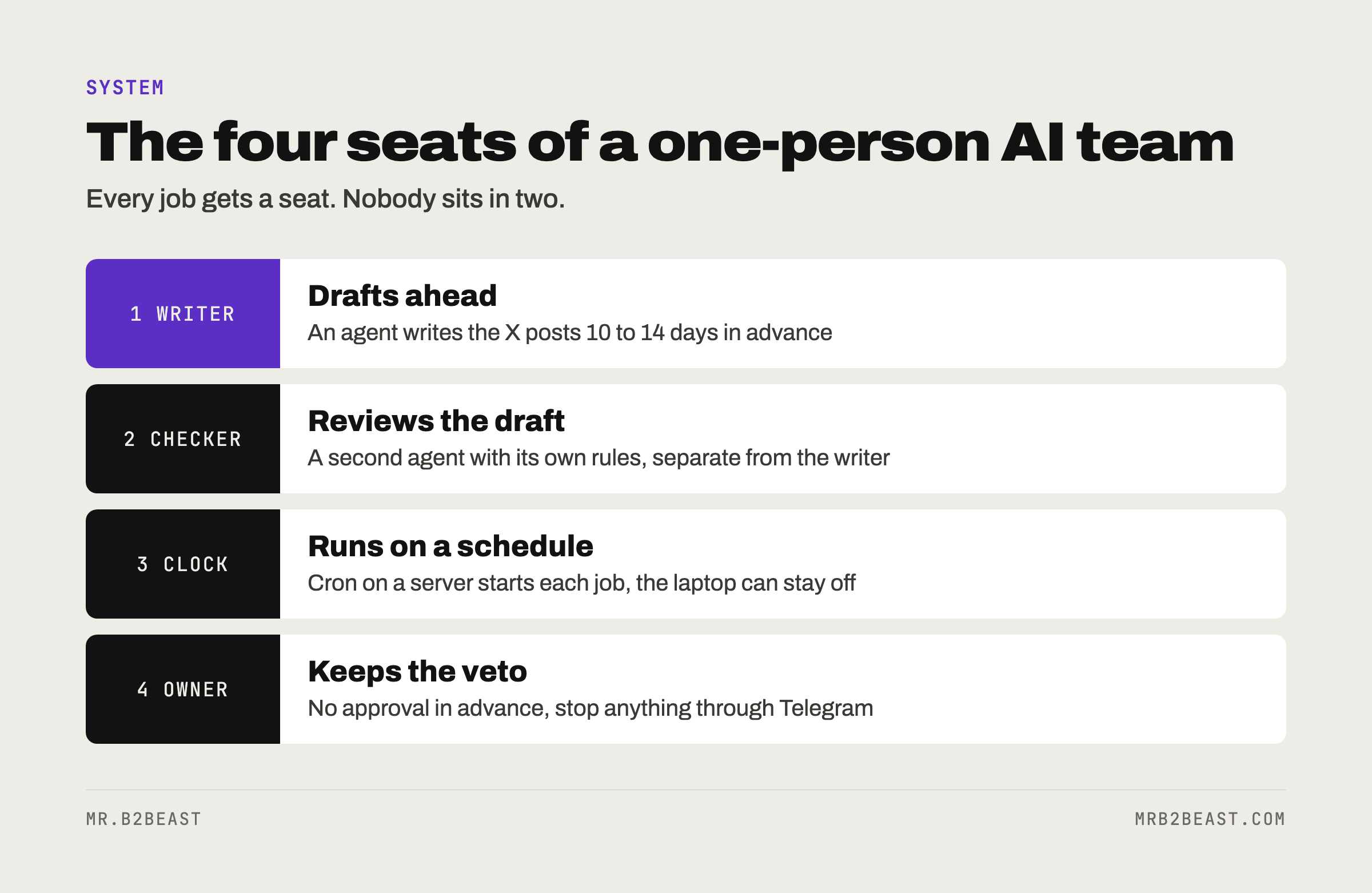
Seat 1: the writer. An agent writes the X posts 10 to 14 days ahead. It runs as Claude Code, headless, started by cron on my own Hetzner server. Nobody types a prompt in the morning.
Seat 2: the checker. A second agent reviews what the writer produced. It is a separate role on purpose. The one who writes is the worst person to judge the draft, and that is true for agents too.
Seat 3: the clock. Cron on the server decides when jobs run. The machine on my desk can be off. The work still happens.
Seat 4: the owner. That is me. I give no approval in advance. I only stop, through Telegram, what I do not like. Because the posts are 10 to 14 days ahead, there is time to look before anything goes out.
Around these four seats sit the routine jobs:
- Replies to mentions go out through the X API, at most 20 a day.
- A follower check runs three times a week.
- Every new article goes out automatically as an X post. That has been running since 2026-10-08.
- Since 2026-10-20, an agent writes the newsletter on Mondays and schedules it for Tuesday 15:00.
- The welcome email goes out automatically after someone confirms their signup.
The tools come in through MCP, the Model Context Protocol, an open standard for connecting AI applications to outside systems. In Claude Code I use Postiz on my own server to schedule the X posts, Composio for other apps, Chrome control for browser tasks, and Context Mode to keep large tool outputs out of the context. One tool I run on purpose through a script instead of MCP: DataForSEO, so every query gets logged with its cost. If MCP is new to you, Claude MCP explained covers the basics.
The loop: how the parts feed each other
An org chart shows who does what. A loop shows why it adds up.
Mine looks like this. An article goes live on mrb2beast.com. It gets announced on X automatically. Readers land in the weekly newsletter. Separately, anyone who replies with the keyword under the lead magnet post gets a DM with the link to the X tips cheat sheet, and the newsletter signup sits on that page. The page is free to read, with no forced signup.
Each piece is small. None of them would matter alone. Together they turn one article into a post, a reason to subscribe and a weekly email, without me pushing each step.
That is the real test of an AI operating system for one person: does one unit of work you do (an article, a decision, a rule) get reused by the system without you carrying it from step to step?
What stays human, on purpose
Here is the list I care about most. These things I never automate:
- Replies under other people's posts. The system writes drafts. I post them myself.
- Follows, except follow-backs.
- Reposts.
- DMs, except the lead magnet DM.
- The engagement group.
- Anything on LinkedIn.
- Emails to individual people.
Why draw the line here? Most of these are about relationships. A reply under someone else's post is me showing up in their space. An email to one person is a conversation. Automating those saves minutes and costs trust.
OpenAI's guide to building agents names two triggers for human oversight: an agent exceeding failure thresholds, and high-risk actions that are "sensitive, irreversible, or have high stakes." For a solo business, a public reply in your name under a stranger's post is a high-stakes action. You cannot unsend it from their notifications.
Write your own version of this list before you automate anything. It is cheaper to decide it on a quiet day than after a reply goes wrong.
How to set up your own AI operating system
You do not need my exact stack. You need the structure. Here is the order I would use if I started again today.
Step 1: Pick one lane. One recurring job that happens at least weekly and does not need you live. Content drafts, a weekly report, a newsletter. Not five lanes. One. The one person business data is a good reminder to build one lane at a time when you are alone.
Step 2: Write the job down before you hand it over. Inputs, steps, done signal, what is off limits. An agent copies whatever process you give it, good or broken. AI workflow automation goes deeper on why the written process comes first.
Step 3: Split writer and checker. Two roles, two sets of instructions. The checker gets the rules, not the creative brief, and the authority to say no.
Step 4: Put the hard rules in code. Instructions are context, not enforcement. Daily limits, time slots, banned words: put them in a script that the model cannot talk its way around.
Step 5: Give yourself a veto and a pause button. Run the work far enough ahead that you have time to look. Get one message per batch, not one per item. Keep a single command that stops everything.
Step 6: Add the second lane only when the first one is boring. Boring means it ran for weeks and you stopped checking every item.
If you want to build the agent itself, the guide to building an AI agent that runs on a schedule walks through the job file, the headless run, the checker, the checks a script should run and what broke around launch.
The honest limits
An AI operating system does not create judgment. It moves your judgment into rules and roles. If the rules are vague, you get vague output on a schedule.
A veto only works if you look. Veto instead of approval saves time, but it shifts the risk to the days you do not open Telegram. The lead time is the safety margin. Shrink it and the veto turns into a formality.
A checker can be too polite. Two agents that share the same blind spot will agree with each other. The checker needs different instructions and, ideally, rules it can check mechanically.
And none of this is the research kind of AI operating system. AIOS solves scheduling and memory for many agents sharing one model. A solo business has a different problem: one person, limited attention, a lot of recurring work. The research on AI agents for small business shows how often agents still fail at plain office tasks. Design for that.
What you learned today
- An AI operating system for one person is roles, tools, a clock and brakes, written down.
- Writer and checker are separate seats. The human owns the veto and the list of things that stay manual.
- Start with one lane, put hard rules in code, and only add the next lane when the first one runs without you.
FAQ
What is an AI operating system? The term has three meanings. In research, it is a kernel that schedules many AI agents on shared models, like the AIOS project. In Andrej Karpathy's LLM OS idea, the language model sits at the center of a computer and ties tools and files together. For a business, it is the written setup of roles, tools, schedule and brakes that lets AI work run without you starting each task.
Is an AI operating system the same as a personal AI assistant? No. A personal AI assistant responds when you ask and stops when you close it. An AI operating system runs jobs on a schedule, splits work across roles such as writer and checker, and has rules for when a human steps in.
What does an AI chief of staff do? An AI chief of staff coordinates instead of doing every task. It routes work to the right agent or tool and surfaces the decisions that need you. In a one-person business, that role is often split between a schedule, a checker agent and a short message to the owner.
Do I need to code to build an AI operating system? Not for the structure. Roles, rules and a never-automate list are writing work. Running agents on a server on a schedule does take some technical setup, and the hard limits work best as small scripts rather than prompt instructions.
What should I never automate in a one-person business? Start with anything public, personal or hard to undo: replies under other people's posts, direct messages to individuals, follows, and emails to one person. These are relationship actions. Automate the preparation, such as drafts, and keep the final click yourself.
About the author
Tristan Eilenburg. One person. AI systems. Global reach. I write about building systems that work, with evidence instead of hype.
- X: @MrB2Beast
- LinkedIn: Tristan Eilenburg
- Instagram: @mrb2beast
The newsletter goes out once a week. If this one taught you something, the newsletter is where the next one lands first.
Sources
- Mei, K., Zhu, X., Xu, W., Hua, W., Jin, M., Li, Z., Xu, S., Ye, R., Ge, Y., and Zhang, Y. (2024). AIOS: LLM Agent Operating System. arXiv:2403.16971. https://arxiv.org/abs/2403.16971
- Karpathy, A. (2023, November). [1hr Talk] Intro to Large Language Models. YouTube. https://www.youtube.com/watch?v=zjkBMFhNj_g
- Willison, S. (2023, November 23). Intro to Large Language Models (notes on Karpathy's talk). https://simonwillison.net/2023/Nov/23/intro-to-large-language-models/
- Model Context Protocol (2026). What is the Model Context Protocol (MCP)? https://modelcontextprotocol.io/docs/getting-started/intro
- OpenAI (2025). A practical guide to building agents. https://openai.com/business/guides-and-resources/a-practical-guide-to-building-ai-agents/