How to Build an AI Agent That Runs on a Schedule
Most guides stop at the demo. This one covers the part after: the job file, the headless run, the second agent that checks, the clock and the brake.

If you want to build an AI agent, the internet gives you two options. A framework tutorial with forty lines of Python that answers one question in a notebook. Or a no-code platform with a drag and drop canvas.
Both teach you how an agent thinks. Neither shows you what it takes to keep one running when you are not watching.
Here is the agent I actually run: Claude Code, headless, started by cron on my own Hetzner server. Since 2026-10-19 it writes my X posts 10 to 14 days in advance. A second agent checks them. I only stop, through Telegram, what I do not like.
This guide is the build, in seven steps, plus the three things that went wrong around launch. If you want the bigger picture of how several agents fit together as a team, read AI operating system first. This article is the workshop. That one is the org chart.
Key takeaways
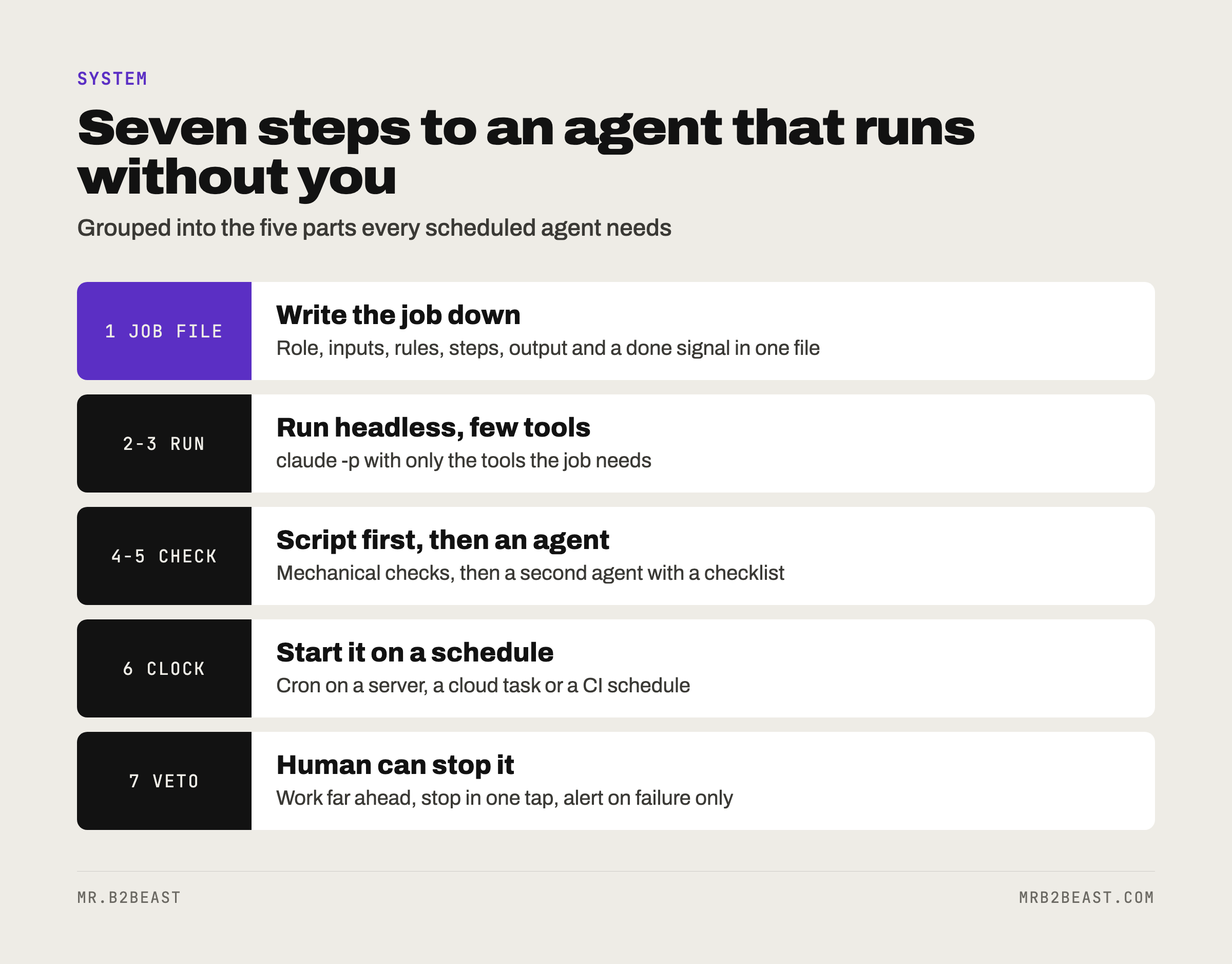
- A scheduled agent needs five parts: a job written as a file, a headless run, limited tools, a checker and a human veto.
- Put timing, limits and anything that must never happen in plain code. Prompts are context, not enforcement.
- Expect a quiet start to be misleading. My checker rejected nothing in its first batch of 24 posts.
What is an AI agent, really?
OpenAI's practical guide to building agents has the cleanest one-line definition: "Agents are systems that independently accomplish tasks on your behalf." The guide names three core parts: a model that reasons, tools it can use to act, and instructions with guardrails.
Anthropic draws a useful line inside that. In "Building effective agents," it calls systems where LLMs and tools follow "predefined code paths" workflows. It reserves the word agents for systems where the model directs its own process and tool use.
A scheduled agent sits in the middle, and that is a good place to be. The trigger is fixed: a time. The job is fixed: write the next batch of posts. What the model decides is the content and how to get there. You get the flexibility of an agent with the predictability of a workflow.
What is a scheduled AI agent? A scheduled AI agent is a language model with tools and written instructions that a clock starts, not a person. It runs a defined job at a defined time, writes its result somewhere a script or a human can check it, and exits. Nobody needs to open a chat window for it to work.
When you should not build an agent
Anthropic's advice is to find "the simplest solution possible" and add complexity only when needed. Sometimes that means "not building agentic systems at all."
I agree, and here is the test I would use. Build an agent only if all three are true:
- The job repeats. At least weekly. A one-off task is faster by hand.
- The job needs judgment, but not taste you cannot write down. Writing a post from a set of approved facts: yes. Deciding which person to befriend: no.
- A wrong result is cheap to catch before it matters. If every mistake is public and instant, you need a human in the loop, not an agent.
If your job is "move data from A to B when C happens," you want a plain automation, not an agent. The AI workflow automation article covers that side, and why the process has to be written before any tool touches it.
Can you build an AI agent on your own?
Yes. You need five things, and none of them requires a team:
- A model with an agent loop. I use Claude Code. Other options exist, more on that below.
- Instructions as a file. Not a prompt you retype. A file in a repository that you can change, version and review.
- A machine that is always on. A small server or a cloud runner. Your laptop sleeps.
- A second set of eyes. Another agent with different instructions, or a script, or both.
- A way to stop it. One command or button that pauses everything.
The skill you need most is not coding. It is writing a job description that a literal reader cannot misunderstand. A tight job file is the cheapest defense against the failure rates collected in AI agents for small business.
How to build an AI agent that runs on a schedule: 7 steps
Here is the build, in the order I would do it again.
Step 1: Write the job as a file
Every scheduled job gets one Markdown file. It answers six questions:
- Role. Who is the agent in this job? One sentence.
- Inputs. Which files may it read? Name them.
- Rules. What must always be true? What must never appear?
- Steps. What it does, in order.
- Output. Exactly where it writes and in which format.
- Done signal. How a script can tell the run worked.
A skeleton you can copy:
# Job: weekly post drafts

Role: You write X posts for the account owner. You do not publish.

Read first:
  rules.md        (voice, banned words, hard limits)
  facts.md        (the only numbers and stories you may use)
  calendar.json   (which slots are still empty)

Rules:
  Use only numbers that appear in facts.md.
  No hashtags. No links except the ones listed in rules.md.
  If a slot needs a fact you do not have, skip the slot.

Steps:
  1. List the empty slots for the next 14 days.
  2. Write one post per slot, following rules.md.
  3. Save everything to queue/<date>.json.

Done: print one line JOB-RESULT ok <count>, or JOB-RESULT failed <reason>.
Two details matter more than they look. First, the facts file. An agent that writes about your business will invent numbers unless you give it a closed list and forbid everything else. Second, the skip rule. A good agent leaves a gap instead of filling it with something plausible.
Step 2: Run it headless
Claude Code has a non-interactive mode. You pass -p with the prompt, and it runs the job and exits. The current documentation describes this as using the Agent SDK through the command line, with the same tools and agent loop that power Claude Code.
The flags that matter for a scheduled agent:
--allowedToolslists the tools the run may use without asking, using permission rule syntax.Bash(git diff *)allows only commands that start withgit diff.--output-format jsonreturns the result plus metadata, includingtotal_cost_usd. The documentation calls these client-side estimates, so treat them as a guide, not a bill.--json-schemamakes the output follow a schema you define, delivered in astructured_outputfield.--bareskips loading hooks, skills, plugins, MCP servers and CLAUDE.md from the environment, so the run behaves the same on every machine. The docs recommend it for scripted calls and say it will become the default for-p. Note that bare mode ignores your subscription login and needs an API key.--permission-prompts nonetells the run that nobody is there to answer a permission prompt, so anything that would ask is denied instead of waiting.
Claude Code exits with code 0 on success and a non-zero code on failure, so a wrapper script can branch on it. That is the whole contract between your agent and the rest of your system: an exit code and a file.
A minimal call looks like this:
claude -p "$(cat jobs/post-drafts.md)" \
  --allowedTools "Read,Write" \
  --output-format json
Step 3: Give it the fewest tools possible
Every tool is a door. A drafting agent needs to read some files and write one. It does not need the shell, the network or your email.
If the job needs an outside system, MCP is the standard way in. You can pass a specific server configuration to a headless run with --mcp-config, so the agent sees only that server. If MCP is new to you, Claude MCP explained covers what a server does.
One rule I would keep even if it costs convenience: the agent writes drafts, a script publishes. In my setup, Postiz on my own server plans the X posts. The model never needs to be the one pressing the final button. A script that reads a checked file and calls an API is boring, testable and cannot be persuaded.
Step 4: Make the output a contract
The agent writes to one file in one format. Then a plain script checks everything a machine can check:
- Length limits, such as 280 characters for a post.
- Banned words and characters.
- Leftover placeholders in square brackets.
- Required fields, such as a time slot for every post.
- Duplicates against what already went out.
This is not paranoia. Anthropic's documentation says Claude treats CLAUDE.md instructions "as context, not enforced configuration," and points to hooks when an action must be blocked no matter what the model decides. The same logic applies to your job file. If a rule must never break, it belongs in code.
Step 5: Add a second agent as the checker
The writer should not grade its own work. Give a second agent its own instructions: the rules, the facts, and the authority to approve, fix or reject each item.
Anthropic describes this as the evaluator and optimizer pattern: "one LLM call generates a response while another provides evaluation and feedback in a loop." It works best, they write, "when we have clear evaluation criteria."
That last part is the catch. A checker with vague criteria approves everything. Give it a checklist, not a vibe. If you work in Claude Code, a subagent is a natural home for the checker: a Markdown file with YAML frontmatter in .claude/agents/, its own system prompt, its own tool list.
Step 6: Put it on a clock
Now the job needs a trigger that is not you.
Cron on a server is what I use. Claude Code runs headless, started by cron on my own Hetzner server. A standard five-field cron line like 0 9 * * 1,4 means 9:00 on Mondays and Thursdays. The server is always on, so the job runs when my laptop is closed.
If you do not want to run a server, Claude Code itself offers other options:
- Cloud scheduled tasks run on Anthropic-managed infrastructure, need no machine of yours to be on, and start from a fresh clone of your repository. The minimum interval is one hour.
- Desktop scheduled tasks run on your machine with access to local files. The machine has to be on.
- GitHub Actions with a schedule trigger.
/loopis for polling inside an open session. It stops when the session ends, and recurring tasks expire after seven days. Fine for watching a deploy, wrong for a standing job.
Pick by one question: does the job need your local files, or can it work from the repository alone?
Step 7: Give the human a veto, not an approval queue
This is the step most guides skip, and it decides whether you keep the agent.
An approval queue means nothing goes out until you say yes. It sounds safe. In practice, the queue becomes a second job, and the agent saves you nothing.
A veto means everything goes out unless you say no. My agent writes 10 to 14 days ahead. The lead time is the safety margin: I have days, not minutes, to see something I dislike and stop it in Telegram.
Not everything belongs on the veto path. Some actions should never be automated at all. In my case that is replies under other people's posts, follows except follow-backs, reposts and DMs except the lead magnet. The agent can draft. I post. The full list, and why it is mostly about relationships, is in AI operating system.
Add two more brakes:
- A pause switch. One file, one command, one button. When it exists, nothing runs.
- Alerts on failure only. One message when a run fails. Silence when it works. A daily "all good" message trains you to ignore messages.
What broke around launch
Here is the honest part. The setup above did not arrive in one piece.

Three posts with empty placeholders. Three weekly recap posts, scheduled from 2026-10-16 to 2026-10-18, still had unfilled placeholders where a number and a post reference should have been. They stayed as drafts in Postiz and never went out. Still, a post with a hole in it had made it all the way into the publishing tool.
One post that failed to publish. A connect post scheduled for 2026-10-19 at 23:00 failed at the moment of publishing. The failure sat in the publishing step, after the writing was done.
A checker that said yes to everything. In the first batch on 2026-10-19, the checker agent reviewed 24 posts and rejected none.
Zero rejections in 24 can mean the writer is perfect. More likely it means the checker has not been tested yet. Here is what I take from those three:
- Mechanical checks go first, before any model reviews anything. Placeholders in brackets are a string match. No agent should be the thing that catches them.
- Watch the step after the agent. Publishing is where a correct draft can still fail. Alert on that step, not only on the agent run.
- Test the checker on purpose. Feed it a post that breaks a rule and see if it says no. A checker you have never seen reject anything is a rubber stamp.
None of these needed a smarter model. They needed better checks around it. That matches the weight both guides give the topic: guardrails, stopping conditions and human checkpoints get as much space as the model itself.
Is it free to build an AI agent?
Not quite, but it can be cheap.
Claude Code needs a Claude subscription (Pro, Max, Team or Enterprise), a Claude Console account with prepaid API credits, or access through a supported cloud provider. I already had Claude Code through my Max plan, which was one of the reasons I moved my site off Lovable and onto my own server.
On top of that come the outside services your agent touches. APIs for social platforms, email tools and data providers often charge per call. Headless runs with --output-format json report an estimated cost per run, which makes a simple log possible: date, job, cost. Do that from day one. A scheduled agent that is cheap per run can still add up over a month of runs.
The other cost is time. The first version is fast. The guardrails, alerts and checks that make it trustworthy take longer. Budget for the second part.
What is the best tool to build an AI agent?
The honest answer: the one whose agent loop you already understand, that can run without a window open.
- Claude Code gives you the agent loop, file tools, subagents and MCP, and runs headless with
-p. That is what this guide uses. - OpenAI builds the examples in its own guide with its Agents SDK, a code-first framework.
- No-code platforms let you build agents on a canvas. Good for trying the idea. Check whether they let you add your own checks and a real pause switch.
Whatever you pick, the seven steps stay the same. The tool changes how you write Step 2. It does not change Steps 1 and 4 to 7.
What you learned today
- To build an AI agent that runs on a schedule, write the job as a file, run it headless with the fewest tools, and make its output a file a script can check.
- Use a second agent as checker, put it on a clock, and give yourself a veto with enough lead time to use it.
- Around launch, three posts with placeholders reached the publishing tool, one post failed to publish and the checker rejected nothing in 24. Mechanical checks and alerts fix most of that.
FAQ
Can I build an AI agent on my own? Yes. A single person can build and run a useful agent with a model that has an agent loop, instructions written as a file, an always-on machine, a checker and a pause switch. The hardest part is writing a job description precise enough for a literal reader, not the code.
Can you build an AI agent with ChatGPT? OpenAI offers its own tooling for agents, and its practical guide builds its examples with the OpenAI Agents SDK. The same principles apply as in this guide: a model, tools, clear instructions with guardrails, and a plan for human intervention when the agent fails or faces a high-risk action.
Is it free to build an AI agent? Usually not entirely. Claude Code needs a paid Claude plan, API credits or a cloud provider, and most outside APIs your agent calls charge per use. Track the estimated cost of every run from the start so you see the monthly total early.
What is Claude Code headless mode?
Headless mode means running Claude Code without the interactive interface by passing the -p flag with a prompt. It runs the task, prints the result, and exits with code 0 on success. Flags like --allowedTools, --output-format json and --bare make it suitable for scripts and scheduled jobs.
How do I stop a scheduled AI agent from doing something wrong? Use layers. Limit its tools, check its output with a script before anything is published, add a second agent as reviewer, and keep a human veto with enough lead time to use it. Add a single pause switch that stops every run.
About the author
Tristan Eilenburg. One person. AI systems. Global reach. I write about building systems that work, with evidence instead of hype.
- X: @MrB2Beast
- LinkedIn: Tristan Eilenburg
- Instagram: @mrb2beast
The newsletter goes out once a week. If this one taught you something, the newsletter is where the next one lands first.
Sources
- OpenAI (2025). A practical guide to building agents. https://openai.com/business/guides-and-resources/a-practical-guide-to-building-ai-agents/
- Anthropic (2024, December 19). Building effective agents. https://www.anthropic.com/engineering/building-effective-agents
- Anthropic (2026). Run Claude Code programmatically. Claude Code documentation. https://code.claude.com/docs/en/headless
- Anthropic (2026). Run prompts on a schedule. Claude Code documentation. https://code.claude.com/docs/en/scheduled-tasks
- Anthropic (2026). Create custom subagents. Claude Code documentation. https://code.claude.com/docs/en/sub-agents
- Anthropic (2026). How Claude remembers your project. Claude Code documentation. https://code.claude.com/docs/en/memory
- Anthropic (2026). Quickstart. Claude Code documentation. https://code.claude.com/docs/en/quickstart