How to Reset Your Twitter Algorithm on X (Feed and Reach)
There is no reset button. There is a model that reads what you did recently, and you can change what it reads.

People who search for how to reset Twitter algorithm usually mean one of two things.
The first group has a feed that went wrong. Too much politics, rage bait or one topic you clicked once and now cannot escape. You want your For You tab back.
The second group writes on X and watched their reach drop. Posts that used to get a few hundred views now get a few dozen. You want the algorithm to give you another chance.
Both problems have the same root and different fixes. First the feed, then the reach.
Key takeaways
- X has no single reset button for the For You feed. Its ranking model reads your recent engagement, so you reset it by changing your recent engagement.
- For your feed: switch to Following, mark posts as not interested, mute, unfollow the sources, then engage on purpose with what you want more of.
- For your reach: check the penalty triggers before you assume a shadowban, narrow your topic and space your posts. There is no trick that replaces a post people want to read.
Can you reset the Twitter algorithm?
Not with one click. X's help page on the For You timeline describes features to manage it, not a way to wipe it.
What you can do is retrain it. X has open-sourced the system behind the For You feed. The README describes the viewer's recent engagements as the main input to the ranking model. In other words, the feed is a mirror of what you did lately: what you liked, replied to, opened, read to the end and scrolled past.
That is good news. A mirror updates. If you change what you do for a week or two, the feed has new material to learn from.
It also explains why the popular quick fixes do not work. Clearing your browser cache, logging out or reinstalling the app does not touch your engagement history, because that history lives on X's side, not on your phone.
How does the Twitter algorithm work in 2026?
To retrain something, you need to know what it reads. This is the X algorithm as the published code describes it.
Two sources of posts. One part, called Thunder in the code, keeps recent posts from accounts you follow. Another part, Phoenix, finds posts from accounts you do not follow by matching you and posts as vectors. There is also a list of popular recent posts and a clustering system that groups accounts and posts by who engages with them.
One ranking model. A transformer model predicts, for each candidate post, how likely you are to take a list of actions. The positive ones include favorite (the like), reply, repost, quote, share, clicks on the post, the profile, links and photos, dwell time, video watch time and following the author.
Negative actions count too. The model also predicts the chance that you mark a post as not interested, mute the author, block the author, report the post, or do not stop on it at all. The final score is a weighted sum. Positive actions carry positive weights, negative actions carry negative weights. The README is explicit that these weights scale predicted probabilities, not raw counts.
Some adjustments on top. Posts from accounts you do not follow get multiplied by a factor below 1. Posts from authors below an impression threshold get lifted. And every post after an author's first one in your feed gets a decaying factor, so one account cannot take over your timeline.
A filter before the ranking. Separate visibility filtering decides whether a post can be shown at all. Ranking only decides the order.
So how does the Twitter algorithm work, in one sentence? It guesses what you will do with each post, based on what you did recently, and shows you the posts with the best guessed outcome. The repository keeps a list of dated updates, the latest from September 18, 2026, so treat any detail as a snapshot.
How to reset your X feed in 7 steps
This is the user side. Do the steps in order, because the first ones stop the damage and the later ones build the new feed.
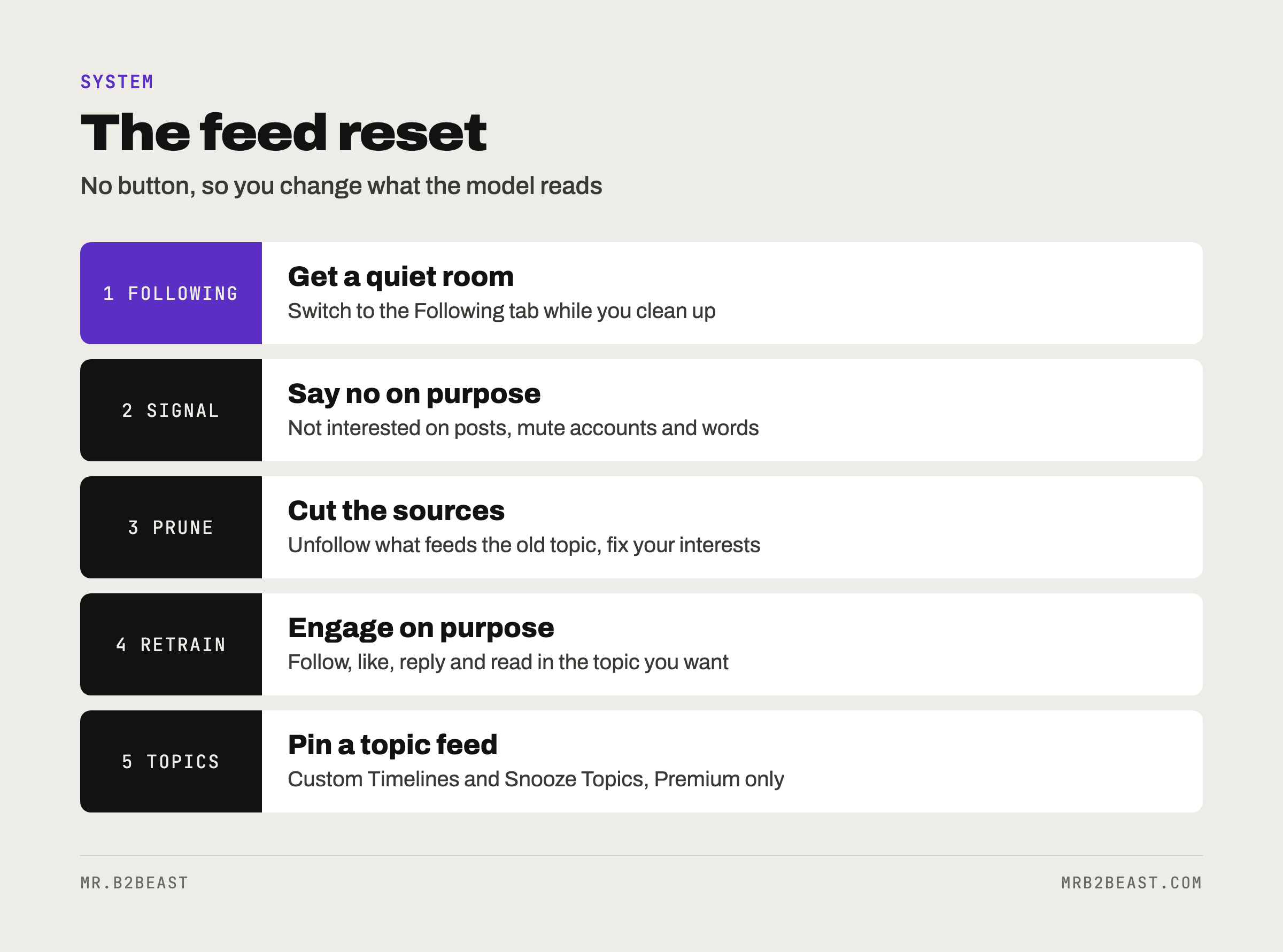
1. Switch to Following while you clean up
X lets you toggle between For You and Following. Following shows only posts from accounts you follow. The app remembers which tab you used last. Use Following as a quiet room while you do the rest.
2. Tell X you are not interested
Posts in For You have a menu with a "not interested" option. Use it on the posts you do not want. In the published code, not interested is one of the negative actions the model tries to predict, and its weight is negative. Ten honest taps beat one angry scroll session.
3. Mute accounts and words
Muting an account removes its posts from your timeline without unfollowing or blocking it, and the account is not notified. Muting a word removes matching posts from your Home timeline, notifications and replies. It is case insensitive, also catches the hashtag version of the word, and by default lasts forever. Mute the topic words that keep pulling you back in, not just the accounts.
4. Unfollow the sources
The in-network part of the feed is built from the accounts you follow. If you followed fifty accounts during one heated week, they will keep feeding you that week. Go through your following list and cut the ones you no longer want to hear from. Spread big cleanups over several days so the activity does not look automated.
5. Clean up your interests
On the web, X keeps a list of interests under Settings and privacy, then Privacy and safety, then Content you see. You can uncheck the ones that are wrong. One guide notes that this list matters less than it used to, because the feed now leans on the AI ranking. It is still worth two minutes.
6. Retrain with deliberate engagement
This is the step most people skip, and it is the one that does the work. The model reads your recent engagements, so give it new ones. Follow a handful of accounts in the topic you want. Like and reply to their posts. Read the long ones to the end. Open the profiles.
One creator in my library goes further: bookmarking or sharing a post makes similar topics and formats show up almost immediately, so he uses it on purpose to steer his feed. That is one person's observation, not a documented rule, but it fits the published list of actions the model predicts.
7. Use topic feeds and snooze
In April 2026, X added Custom Timelines: topic feeds that Grok sorts posts into, with more than 75 topics to choose from and up to 10 topics or lists you can pin. At launch they were for Premium subscribers on iOS. X told TechCrunch that Grok reads posts and labels them by topic, instead of relying on keywords or hashtags. Alongside that, Snooze Topics hides a topic such as politics or sports from your feed for 24 hours, for Premium users on iOS and the web.
If you have Premium, a topic feed is the fastest way to get the feed you want without waiting for For You to catch up.
How do I wipe my Twitter clean?
This one comes up a lot, and it usually means one of three different things.
Wipe the feed. Covered above. No single switch, but the seven steps work.
Wipe your profile. You can delete posts, unlike posts and unfollow accounts by hand. That cleans what other people see. It does not guarantee a clean recommendation profile, and I would not do it for feed reasons alone.
Start over. A new account starts with no engagement history at all. It also starts with no followers, no history and no audience. For a feed problem, that is a sledgehammer. Use it only if you want a new identity anyway.
How long does it take to reset the X algorithm?
X does not publish a number, and I have not found a measurement I trust. What the code says is that recent engagement drives the ranking. So the honest answer is: as long as it takes for your new behavior to outweigh your old behavior.
A practical test: do steps 1 to 6 for seven days, then spend ten minutes on For You and count how many of the first 20 posts you actually wanted. Write the number down. Repeat a week later. If the number goes up, keep going. If it does not, you are probably still engaging with the old topic somewhere, often by hate-reading it.
Resetting your reach: what the X algorithm rewards now
Now the creator side. If your own posts lost reach, there is no reset for that either. But there is a list of things to check, and it starts with the boring ones.

Check the penalty triggers before you blame a shadowban
One creator puts it bluntly: before you assume a shadowban, check three triggers. Engagement spam, like posting the same line over and over. Conflict bait and all-caps BREAKING posts. And sensitive or adult content. If none of those apply, you are probably not being punished. You are probably just not being shown.
The published code backs the logic, if not the exact list. Every post gets a predicted chance of not interested, mute, block and report, and those carry negative weights. Bait that makes people mute you is not a hack. It is a cost.
Stop looking for hacks
Two creators, across three videos, say the same thing in different words: since the switch to the AI ranking, signal tricks matter less, because the system reads the content itself and judges whether it is worth showing. Another observes that distribution is slower now, so do not write a post off after an hour. And three videos from two creators remind you that whatever worked at the start can stop working, because the algorithm keeps changing.
This is why I do not believe in a reach reset trick. The model predicts whether people will do something with your post. The only reliable way to change that prediction is to post things people do something with.
Narrow the topic
Two creators, again across three videos, say the same: pick one narrow topic so Grok files your account under it and shows it to people who follow that topic or pinned it as a feed. With topic feeds now in the product, that advice has a clear mechanism behind it. A post about everything has no shelf to sit on.
Space your posts
The author diversity factor in the code means your second and third post in someone's feed are discounted. One creator recommends at least three hours between your own posts. Spacing is the cheapest fix on this list.
Use the moment after a good post
Two creators say the same thing about momentum: after one of your posts takes off, your next one or two posts get shown to the people who engaged with it. That is the time for your best post or your call to action, not a throwaway.
Drop hashtags
The topic feeds sort posts by what Grok reads in them, not by tags. I stopped using hashtags on X. Name the topic in plain words in the first line instead.
A 14-day reach reset plan for creators
Put the creator side into one plan. It is the same idea as the feed reset, pointed at your own account: stop the negative signals, then feed the model better material.
- Days 1 to 2: audit. Read your last 30 posts. Flag anything that repeats itself, baits outrage or could get a sensitive label. Delete or stop that format.
- Days 1 to 14: one topic. Write only about the one topic you want to be known for. Put the topic words in the first line, in the words people search with.
- Days 1 to 14: fewer, spaced posts. One to four a day, at least three hours apart. That range is the one tip all 5 creators in my library agree on.
- Days 1 to 14: replies where your topic lives. Reply to accounts in that topic so the people who might follow you see your name next to the subject.
- Day 14: measure. Compare views per post, profile visits and new followers with the two weeks before. The four numbers I check weekly are a good template.
If you are still near zero followers, a reach reset is the wrong frame. You do not have reach to reset yet. Start with how to get followers on Twitter instead, which is built for exactly that stage.
Feed reset and reach reset are the same lesson
Both halves of this article point at one idea. The X algorithm does not hold a grudge and does not hand out second chances. It predicts what people will do, based on what they did recently.
As a user, you change your feed by changing what you do. As a creator, you change your reach by changing what other people do with your posts. Neither has a button. Both respond within days to consistent new behavior.
For the full list of X tips that at least two creators back up, with the videos behind each one, see the free X tips cheat sheet. My account is small: 531 followers on October 21, 2026, according to the X API. I am testing these rules in public, and the open stats page shows what I publish.
FAQ
How do I reset my Twitter? There is no reset button for your X feed. Switch to the Following tab, mark unwanted posts as not interested, mute accounts and words, unfollow the sources and then engage on purpose with the topics you want. The ranking model reads your recent engagement, so new behavior produces a new feed.
How do I reset Twitter suggested pages? Suggestions on X come from the same engagement history as the For You feed. Unfollow and mute what you do not want, clean up your interests under Privacy and safety, then Content you see, and follow a few accounts in the topic you want. With Premium, pinned topic feeds give you a curated view right away.
How do I reset my feed on X? Use the seven steps: Following tab, not interested, mute, unfollow, interests, deliberate engagement and topic feeds. Do them for seven days, then count how many of the first 20 For You posts you actually wanted. Repeat a week later to see if it improved.
Does switching to the Following tab reset the algorithm? No. It only changes which view you look at. Following shows posts from accounts you follow, while For You keeps learning from what you do. It is useful as a calm view while you clean up, not as a reset.
Can I reset my reach on X after it dropped? Not directly. First check for engagement spam, outrage bait and sensitive content, which one creator names as the main penalty triggers. Then narrow your topic, post one to four times a day with at least three hours between posts and measure again after two weeks.
About the author
Tristan Eilenburg. One person. AI systems. Global reach. I write about building systems that work, with evidence instead of hype.
- X: @MrB2Beast
- LinkedIn: Tristan Eilenburg
- Instagram: @mrb2beast
The newsletter goes out once a week. If this one taught you something, the newsletter is where the next one lands first.
Sources
- xAI and X (2026). x-algorithm: the For You feed recommendation system, README. https://github.com/xai-org/x-algorithm
- X Help Center (2026). About your For you timeline on X. https://help.x.com/en/using-x/x-timeline
- X Help Center (2026). How to mute accounts on X. https://help.x.com/en/using-x/x-mute
- X Help Center (2026). How to use advanced muting options. https://help.x.com/en/using-x/advanced-x-mute-options
- X Help Center (2026). How you can control your privacy. https://help.x.com/en/resources/how-you-can-control-your-privacy
- Roboin (2025, October 21). Where is the Interests setting on X (Twitter)? https://roboin.io/article/en/2025/10/21/android-twitter-interest-settings-guide/
- TechCrunch (2026, April 22). Hands on with X's new AI-powered custom feeds. https://techcrunch.com/2026/04/22/hands-on-with-xs-new-ai-powered-custom-feeds/
- Engadget (2026, April). X finally adds custom timelines. https://www.engadget.com/social-media/x-finally-adds-custom-timelines-103130966.html
- Ruiz, M. How to Dominate the New X Algorithm in 14 Minutes. YouTube. https://www.youtube.com/watch?v=Z-sAmX7zeJc
- Edmunds, J. C. 7 Things The X Algorithm Hates (STOP Doing These). YouTube. https://www.youtube.com/watch?v=qNHCNQ_t-V8
- Edmunds, J. C. (2026). How To Beat The New X Algorithm In 9 Minutes. YouTube. https://www.youtube.com/watch?v=ZYiEId25OnA
- Ruiz, M. (2026). X/Twitter Is STILL on 'Easy Mode' (Anyone Can Blow Up in 2026). YouTube. https://www.youtube.com/watch?v=ujj-gTRXpWc